

Home » Android
Popular Posts
-
 WhatsApp is rolling out the voice calling feature to all Android users. WhatsApp, the most popular messaging app in the world with over 70...
-
200 million users on Apple iOS 7devices updated introduced last week. And very likely features in iOS 7 this video
-
 The iSight is an amazing still camera. And it’s every bit as amazing when it comes to video. Capture moments in stunning 1080p HD. Take st...
-
 Give iPhone a home on your nightstand Rubber bar functions as a slap-happy snooze button Built-in cord catch keeps the cable (not inclu...
-
 We must be getting close to an iPad refresh, because the leaks are becoming more and more prevalent. Hot on the heels of the video that su...
How to Activate WhatsApp Calling

If you are not on Android you'll have to wait a while to get this feature. But if you use Android, and haven't yet activated voice calling on WhatsApp, you can follow this procedure. If these steps don't work, it's possible WhatsApp has temporarily paused the rollout, and you should try again after some time.
If you are ready to activate WhatsApp free voice calling, remember the process isn't as simple as updating WhatsApp to start using these features. It involves a couple more steps that you need to follow. We've described these below, so take a look to enable voice calling on WhatsApp for Android.
Download the latest version of WhatsApp for Android from here. The latest version on WhatsApp's website is 2.12.14, but if you're downloading from Google Play, ensure that your device has version 2.11.561. Older versions don't support this feature for all users.
Once you have the latest version of WhatsApp installed on your Android phone, ask someone who has WhatsApp calling enabled to make a WhatsApp call to your number.
Multiple users have reported that giving a missed call doesn't work. You'll have to receive the call and wait for a few seconds before disconnecting to activate WhatsApp voice calling.
When the feature is enabled on your smartphone, you'll see a new three-tab layout on WhatsApp, one each for Calls, Chats and Contacts.
Have you used WhatsApp calling on Android? Does the feature work well? Let us know via the comments. For more tutorials, visit our How To section.
Muku Shuttr: World’s Thinnest Bluetooth Camera Remote for iPhone & Android
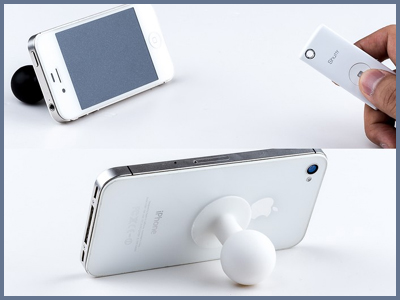
Muku Labs has developed a Bluetooth camera remote called Muku Shuttr for iPhone & Android.
Kickstarter had already funded the Shuttr project that works without downloading or installing 3rd party camera app on devices running iOS 5+ and Android 4.1+.
Muku Labs also claimed that Shuttr would be a 6mm world’s thinnest camera remote and will be available in black or white.
Muku Shuttr World Thinnest Bluetooth Camera Remote for iPhone Android 0 Muku Shuttr: Worlds Thinnest Bluetooth Camera Remote for iPhone & AndroidTechnical Specifications:
Dimension: 61X 26 X 6mm
Weight: 10g
Connectivity: Bluetooth 3.0
Working range: 10 meter
Power Source: Replaceable RC2025 battery
Battery life: Up to 2 years if switched off each time after use
Weight: 10g
Connectivity: Bluetooth 3.0
Working range: 10 meter
Power Source: Replaceable RC2025 battery
Battery life: Up to 2 years if switched off each time after use
If you a photography lover then heads to the Kickstarter and pledge $29 to get one of the first Muku Labs units.
To keep yourself updated with latest Tech News, follow us on Twitter, like our Facebook page, add us to your Google+ circles or subscribe to our Newsletter.


